Resetting a Locked Browser Due to a Concurrent Login Attempt
The Reset Locked Browser feature restores a user's ability to log back in to Lending Cloud if the user is unable to return to the original session after attempting a second login that the system denies. The system also prevents a second login if the user did not log out of the first Lending Cloud session and instead attempted to "X" out of their browser or a browser tab. When denying the second login attempt, the system also displays a message for the user with instructions for returning to the original login session.
Use the Reset Locked Browser field on the User Management page for a locked-out user to provide the ability to log back in to Lending Cloud.
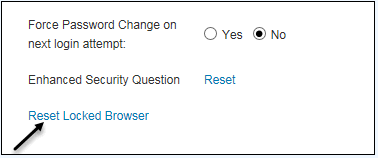
Click the Reset Locked Browser link and then click the Save & Stay or the Save & Back button to unlock the browser and enable the user to log back in to Lending Cloud.
The Protecting Against Unauthorized Logins section contains more information about Lending Cloud's prevention of a second login by the same user and instructions for logging out of Lending Cloud.