Controlling the Restriction on Concurrent Logins
The Concurrent Login Restriction feature is part of Lending Cloud's protection against unauthorized logins. This security feature prevents a user who is already logged in from logging in a second time.
The Concurrent Login Restriction feature requires that users log out of Lending Cloud correctly to be able to log in again. The Protecting Against Unauthorized Logins section contains more information about the feature and instructions for logging out of Lending Cloud.
A System Settings field enables you to control whether your institution uses the feature.
Warning! Disabling the Concurrent Login Restriction is not a recommended security best practice. Disabling the restriction might increase the chance of unauthorized third-party access to your company's site. Prior to disabling the restriction, it is recommended you confirm that by doing so you are not violating your organization's security policies.
Take the following path from the Lending Cloud menu on the Locator page to access the Concurrent Login Restriction field:
Defaults > Customize > System Settings > Security
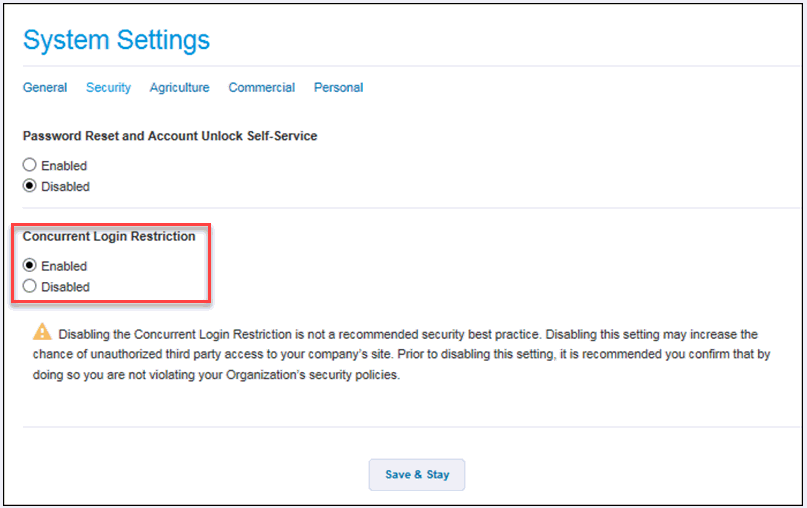
To enable the restriction on concurrent logins
If your institution chooses to use the feature that prevents concurrent
logins for a user, select the Enabled
button for the Concurrent Login restriction field. Then click the Save & Stay button.
To disable the restriction on concurrent logins
If your institution chooses not to use the feature that prevents concurrent logins for a user, select the Disabled button for the Concurrent Login restriction field. Then click the Save & Stay button.