Ag Peer Comparison Active Graphs With Data Tables Report
The Ag Peer Comparison Active Graphs With Data Tables report contains the active graphs and comments that appear on a borrower's Peer Comparison page and the following tables related to the graphs:
- Values
This table contains the ratios or amounts that are displayed on a graph.
- Counts
This table contains the number of statements from which the values on a graph were calculated.
Generating the report enables you to provide a borrower with a copy of the graphs, any comments, and supporting data when discussing comparisons between the borrower and the borrower's peers.
Note You
can include the Active Graphs With Data Tables report in a Reports Package.
To generate, print, and export the Active Graphs With Data Tables report
Before generating the report, confirm the following in the borrower's record:
- The Peer Comparison Setup page has been completed
- The active graphs for the Peer Comparison page have been selected
- The active graphs on the Peer Comparison page are arranged in the preferred order
- Any applicable comments are in the text box on the Peer Comparison page
Take the following steps to generate, print, and export the Active Graphs With Data Tables report:
1. When in the borrower's record, take the
following path from the Lending Cloud menu:
Reports > Available
Reports > Peer Comparison
> Graphs
2. From the Graphs menu, select Active
Graphs With Data Tables.
The system places the report title in the Selected Reports column.
3. From the Selected Reports column, click
the Print Reports button.
The system opens the report in a window. The graphs and tables appear in
the general order of the graphs on the Peer Comparison page. If comments
were entered in the text box on the Peer Comparison page, that information
appears near the end of the report. If the text box on the Peer Comparison
page is empty, the box does not appear.
A task bar at the
top of the window enables you to navigate, export, refresh, and print
the report.
Following is an example
of a page from the report containing comments:
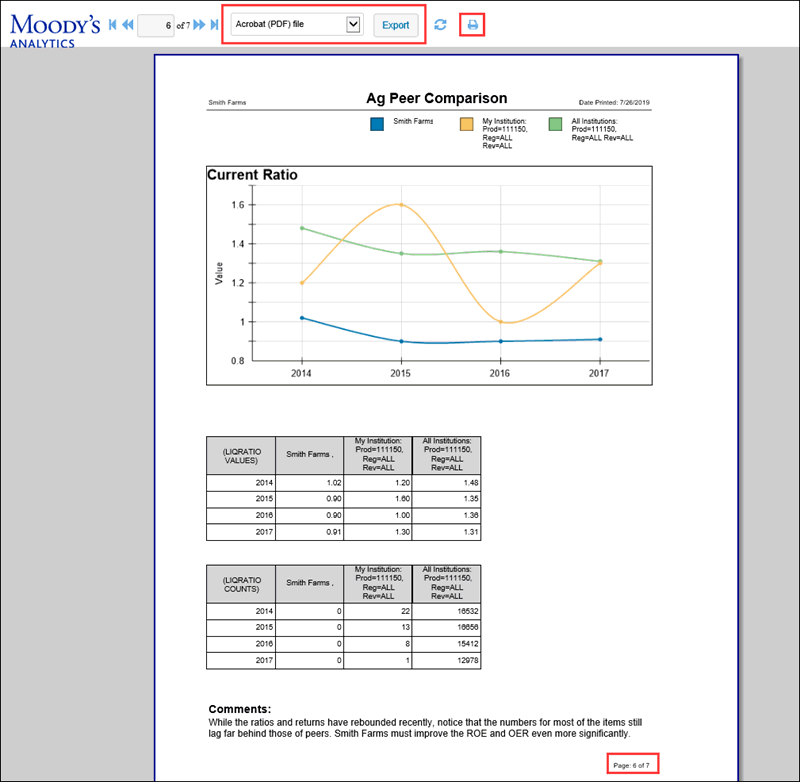
If the 3-year or 5-year option is selected from the Section drop-down list
on the Peer Comparison Setup page, one graph and the two data tables appear
on each page. If the 7-year, 10-year, or ALL option is selected from the
Section drop-down list, each graph and the related data tables appear
on separate pages to accommodate the display of the extra years of data.
For all graphs in the report, the "My Institution" cells on the
Values table contain medians derived from the aggregation of individual
borrowers' metrics from the user's institution. The "All Institutions"
cells on the Values table contain medians derived from the aggregation
of individual borrowers' metrics from all contributing institutions in
Lending Cloud. A median is a robust measurement that allows for tolerance
of some data quality issues at the borrower level while still returning
quality aggregate results.
The "My Institution" and "All Institutions" cells on
the Counts table contain the number of statements from which metrics were
aggregated to determine the medians that appear in the corresponding cells
on the Values table.
The Ag Peer Comparison
Data Selection Details section contains information about how financial
statements are selected, metrics are selected and aggregate, and data
is refreshed for Ag Peer Comparison.
The following disclaimer appears at the end of the report:
*Please note, X & Y axis scales on the printed reports may differ from
what appears on your screen.
** Peer Comparison-only active graphs are shown
Note Although the X-axis
and Y-axis scales on the printed reports might differ from how the scales
appear on your screen, any differences do not affect the accuracy of the
data representation.
4. To print the report directly from the
window, click the printer icon  in the task bar.
5. To export the report, select Acrobat (PDF) file, Excel Worksheet, or Word Document from the format drop-down list in the task bar, and click the Export button.