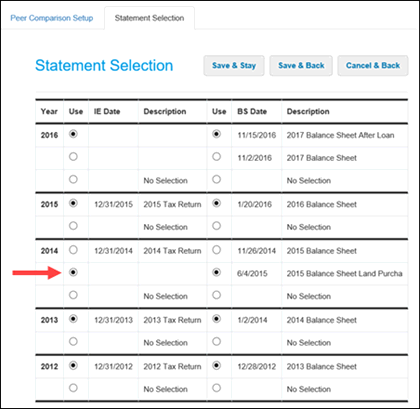
The Statement Selection page enables you to review and adjust the financial statements that are selected to be in the calculations for borrower metrics. The page displays spreads for each year in the order of quality determined by the system. The "best" statement always appears in the top row and is the default selection.
You can use the Statement Selection page to override the automated statement quality logic for specific borrower scenarios.
When in a customer record, select Ag Peer Comparison > Peer Comparison Setup > Statement Selection to access the Statement Selection page.
As shown for 2014 in the following example, you can choose a different spread for metric calculations, including a balance sheet that has no associated income/expense statement.
If you do not want to perform the calculation for a specific year, select the No Selection radio button for that year.
After completing your selections, click the Save & Stay button or the Save & Back button.
When a new statement is created, the system will again choose the first spread listed for the year as the default selection.
Note See How Financial Statements are Selected in the Ag Peer Comparison Data Selection Details section for information about the process that determines the "best" financial statements for peer comparison.